Google Business Profile Optimization: Step-by-Step Guide (2026)
Rohit Nandan
Founder & Lead Digital Marketing Consultant
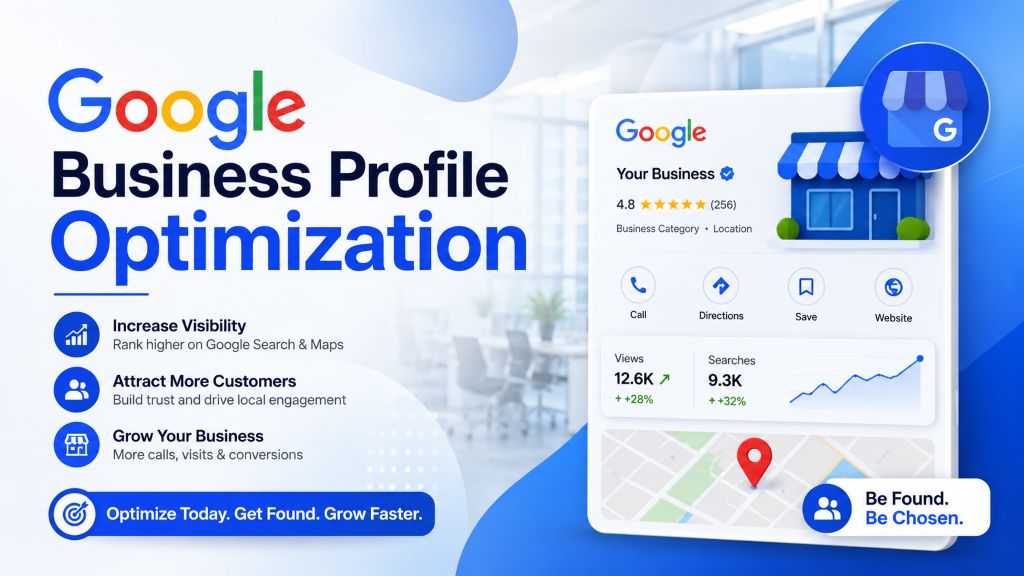
Quick answer: Google Business Profile optimization means completing and actively maintaining every element of your free Google listing — categories, description, photos, posts, reviews, and Q&A — so Google shows it more often and customers trust it more when they find it. The highest-impact steps are choosing the right primary category, uploading photos weekly, and building a steady, recent stream of reviews with responses. In 2026, profile completeness and ongoing activity matter more than they used to — and verification itself has changed, with most new and edited profiles now requiring a live video walkthrough instead of a mailed postcard.
Your Google Business Profile (GBP) is often the first thing a potential customer sees about your business — before your website, before your social media, sometimes before they even know your name. It shows up in Google Search, Google Maps, and the local “3-pack” that appears for searches like “dentist near me” or “best cafe in Noida.”
If you’ve just discovered that your business has a Google listing you never fully set up — or heard the term “GBP optimization” from an agency and want to understand it before paying anyone — this guide is written for exactly that starting point, then goes as deep as you need. Google Business Profile optimization in India follows the same core principles nationally, with the specific tactics below tuned for how local SEO for small businesses actually works in a market as dense and competitive as Delhi NCR.
Yet most businesses set up their GBP once, fill in the basics, and never touch it again. That’s a missed opportunity. A fully optimized profile doesn’t just look more professional — it directly influences how often you show up in local search and how many of those views turn into calls, visits, and bookings.
A quick note on scope: this guide walks through setting up and completing every part of your profile properly, field by field. If you’ve already done that and want to know what specifically moves you up the map pack against competitors, our companion guide — How to Rank #1 on Google Maps in Delhi NCR — covers the ranking-factor side of things (citations, backlinks, review velocity, location pages, and spotting fake competitor listings) in more depth. Read this one first if you’re starting from scratch.
What Is a Google Business Profile?
A Google Business Profile is a free listing that lets your business appear on Google Search and Google Maps with key details — your address, hours, photos, reviews, services, and posts. It used to be called “Google My Business,” but Google rebranded and folded it directly into Search and Maps in 2021 — the underlying Google My Business ranking factors (relevance, distance, prominence) carried over unchanged under the new name.
If you haven’t claimed yours yet, you can do that directly at google.com/business.
What Changed for GBP Specifically in 2026 {#whats-new}
Beyond the general ranking shifts covered in our Maps guide, a few changes affect how you should approach setup and maintenance specifically:
- Verification now defaults to a live video walkthrough, not a postcard. As of mid-2026, Google shifted most new and edited profiles to video verification, filmed live through the Google Maps app, as the primary method — see Step 1 below for exactly what’s required. This is a direct response to how easily postcard verification could be gamed with a fake or virtual address.
- Completeness is scored more strictly. A profile missing attributes, service details, or regular photo updates now underperforms a fully filled-out one by a wider margin than it used to — treat every field below as required, not optional.
- Stale activity is penalized more visibly. A profile with no new photos, posts, or review responses in the last few months increasingly reads to Google as inactive or potentially abandoned, even if the business itself is running fine. The weekly-maintenance habit in Step 10 below isn’t a nice-to-have anymore.
For Google’s own official guidance on ranking factors, see Google’s tips to improve your local ranking.
Full Optimization Checklist {#checklist}
| Step | What to do | Why it matters |
|---|---|---|
| 1. Claim & verify | Search for existing listing, claim it, complete video verification | Unverified profiles have limited visibility |
| 2. Business name | Use your exact legal/signage name, no keyword stuffing | Keyword-stuffed names risk suspension |
| 3. Categories | One accurate primary category + relevant secondary categories | Strongest relevance signal Google uses |
| 4. Complete every field | Address, hours, phone, website, attributes, short name | Incomplete profiles now underperform by a wider margin |
| 5. Description | 750-character natural description of what you do and serve | Supports relevance without keyword stuffing |
| 6. Photos | Logo, cover, interior, team, work — weekly updates | Directly drives clicks, calls, direction requests |
| 7. Products/services/booking | List offerings with pricing; enable Book/Reserve | Structured data for matching + easier conversion |
| 8. Messaging & Q&A | Turn on messaging; pre-seed and monitor Q&A | Removes friction; controls the narrative on common questions |
| 9. Reviews | Steady, recent stream with responses to every review | Recency and response rate now matter as much as count |
| 10. Posts | At least weekly, with a clear CTA | Signals an active, trustworthy profile |
| 11. Insights | Track calls, direction requests, and search terms monthly | Shows what’s actually working so you can double down |
Step 1: Claim and Verify Your Profile {#steps}
If your business already has an unclaimed listing (common if customers have left reviews or tagged your location), search for it on Google Maps first instead of creating a duplicate — duplicate listings confuse Google and hurt your ranking.
- Go to Google Business Profile Manager and search for your business name.
- If it exists, click “Claim this business.” If not, create a new listing.
- Complete video verification. Google now requires most businesses to verify with a live, unedited video recorded directly through the Google Maps app — pre-recorded or previously filmed footage isn’t accepted. Per Google’s own video verification guidance, your video needs to be at least 30 seconds, filmed in one continuous take with no cuts, and clearly show your storefront signage, the surrounding area, and proof that you manage or represent the business (such as unlocking a door or accessing a staff-only area). Postcard and phone verification are still offered for some categories and regions, but video has become the default — plan for it rather than assuming a postcard will arrive.
- Wait for verification to complete before making major changes; unverified profiles have limited visibility, and major edits mid-review can reset the process.
Step 2: Get Your Business Name Exactly Right
Use your real, legal business name — exactly as it appears on your signage and official documents.
Avoid this common mistake: Adding keywords to your name, like “ZestRank — Best SEO Agency in Delhi.” This violates Google’s guidelines and can get your profile suspended. Your name field is for your name only — keywords belong in your description and posts, not here.
Step 3: Choose the Right Categories
Categories are one of the strongest relevance signals Google uses to decide which searches your profile should appear for.
- Primary category should be the single most accurate description of your core business (e.g., “Digital Marketing Agency,” not the broader “Marketing Agency” or vaguer “Consultant”).
- Secondary categories should cover every additional service you genuinely offer — but don’t add irrelevant categories just to appear in more searches; Google penalizes this.
- Revisit your categories every few months, since Google periodically adds new, more specific options.
Step 4: Complete Every Single Field
An incomplete profile is a weak profile, and this matters more in 2026 than it used to. Fill in:
- Address — exact and consistent with your website and other directories.
- Service area — if you serve customers at their location rather than (or in addition to) a physical storefront.
- Hours — including holiday hours; outdated hours hurt user trust and experience signals.
- Phone number — a local number performs better for local trust than a toll-free or generic number.
- Website URL — link to a relevant landing page, not just your homepage, where possible.
- Attributes — things like “Women-led,” “Wheelchair accessible,” “Free Wi-Fi” — these help you match more specific searches.
- Custom short name — set a memorable short URL (g.page/yourbusiness) if available; it’s a small detail but makes your profile easier to share directly in WhatsApp messages and print materials, which is common practice for Delhi NCR small businesses.
Step 5: Write a Strong Business Description
You get 750 characters to describe your business. Use them well:
- Open with what you do and who you serve.
- Naturally include your core services and the areas you serve (e.g., “serving clients across Delhi, Noida, and Gurugram”).
- Avoid keyword stuffing — write for humans first; Google’s systems can detect unnatural repetition.
- Mention what makes you different — certifications, years in business, specialties.
Example (adapt, don’t copy): “ABC Dental Clinic has served families across Sector 62, Noida for over 12 years, offering routine checkups, root canal treatment, and cosmetic dentistry. Same-day appointments available — call or book online.”
Step 6: Upload High-Quality Photos (and Keep Adding Them)
Profiles with more photos consistently get more clicks, calls, and direction requests than text-only listings.
- Add a clear, well-lit logo and cover photo.
- Add interior and exterior photos so customers recognize your location.
- Add team photos — this builds trust before a customer even calls.
- Add photos of your actual work, products, or services — these convert better than generic stock photos.
- Upload new photos regularly (weekly, if possible) — an active profile is treated more favorably than a static one. Short video clips are also supported alongside photos and can help your listing stand out further in a crowded local pack.
Step 7: Add Your Products, Services, and Booking Options
Use the Products and Services sections to list what you offer, with descriptions and pricing where relevant. This gives Google more specific, structured information to match against searches — and it gives potential customers a reason to choose you before they even visit your website.
If you take appointments, turn on the Book or Reserve button integration where your category supports it (available for many service categories through supported booking partners). This lets customers book directly from your profile without a phone call, which both increases conversions and generates another engagement signal. Restaurants specifically should also enable Order Online and Reservation links — our local SEO guide for Delhi restaurants covers this in more depth alongside menu schema setup.
Step 8: Turn On Messaging and Q&A
- Enable direct messaging so customers can reach you straight from your profile without dialing or emailing.
- Monitor the Q&A section — if customers ask common questions, answer them yourself rather than waiting for another user to answer incorrectly.
- Pre-seed a few helpful FAQs yourself to get ahead of common customer questions.
Step 9: Build a Steady Stream of Reviews
Reviews influence both ranking (prominence) and conversion (trust) — and in 2026, recency matters as much as volume.
- Ask satisfied customers for a review right after a positive interaction — timing matters.
- Share your direct review link via WhatsApp, email, or SMS to make it effortless.
- Respond to every review — thank positive reviewers by name, and respond calmly and professionally to negative ones. Google’s own guidance notes that engaging with reviews signals trust and prominence — see Google’s local ranking tips for the official breakdown.
- Never use fake or incentivized reviews — Google’s detection systems are increasingly effective at catching and penalizing this.
Step 10: Post Regularly Using Google Posts
GBP Posts let you share updates, offers, events, and new products directly on your profile.
- Post at least once a week to keep your profile active.
- Include a clear call-to-action button (“Call Now,” “Learn More,” “Book,” “Order Online”).
- Use real photos, not generic graphics, for higher engagement.
Step 11: Track Performance with Insights
Google Business Profile gives you built-in analytics — use them.
- Monitor how customers find you: direct searches (your business name) vs. discovery searches (category or product terms).
- Track calls, direction requests, and website clicks over time.
- Use this data to see which photos, posts, or categories are driving the most action, and double down on what’s working.
- For a deeper look at how these engagement metrics actually connect to map pack position over time, see our Google Maps ranking guide, which also covers how to spot and report spam or fake competitor listings.
Common GBP Optimization Mistakes to Avoid {#mistakes}
- Leaving fields incomplete (“set and forget” profiles rarely rank well, and rank worse for it in 2026 than in past years)
- Inconsistent address or phone number across your website and other directories
- Ignoring negative reviews instead of responding professionally
- Using a P.O. box or virtual address instead of a real, staffed location — this also causes video verification to fail outright, since ineligible addresses can’t be verified regardless of footage quality
- Letting hours go stale, especially around holidays
- Assuming postcard verification will arrive, without preparing for the video walkthrough that’s now the default
For a broader set of local SEO tactics beyond your GBP alone, see our Top 10 Local SEO Tips for Delhi NCR Businesses.
How Often Should You Update Your GBP?
Treat it like a living page on your website, not a one-time form. A quick weekly habit — one new photo, one post, a response to any new reviews — keeps your profile active and signals to Google that your business is genuinely operating and engaged. This weekly rhythm matters more now than it did even a year ago, as covered above.
Should You Manage Your GBP Yourself or Hire a Professional?
The setup steps above (Steps 1–8) are manageable for most business owners to do themselves. Where many businesses struggle is the ongoing part — weekly posts, review monitoring, and tracking which optimizations are actually moving the needle. This is why many businesses in Delhi NCR choose Google Business Profile management services rather than handling it ad hoc — a dedicated local SEO expert can also maintain consistency even when you’re busy running the business itself. Our case study on scaling a local business’s leads by 410% shows what consistent GBP management looks like in practice, alongside the other levers that moved the needle.
Final Thoughts
A fully optimized Google Business Profile is one of the highest-leverage, lowest-cost things a local business can do in 2026. It takes a few focused hours to set up properly and a few minutes a week to maintain — and the payoff is consistently more visibility in the searches that matter most: the ones from people ready to buy, nearby, right now. Once your profile is fully built out (and verified — plan for that video walkthrough), your next step is turning that completeness into actual map pack position — covered step by step in our Google Maps ranking guide.
Want it done right the first time?
ZestRank offers dedicated Google Business Profile optimization services in Delhi and Ghaziabad as part of our broader local SEO services — from initial setup and verification support to ongoing review generation and Google Maps ranking tracking. If you’re specifically in Ghaziabad, or run an appointment-based business like a salon or clinic, we tailor this same process to your exact local market and category. We also offer full digital marketing services if you need SEO, PPC, or social media support alongside your local presence. Book a free local SEO audit and we’ll show you exactly what’s missing from your current profile.
Frequently Asked Questions {#faqs}
Is Google Business Profile free to use?
Yes, creating and managing a Google Business Profile is completely free. Google does not charge businesses to claim, verify, or optimize their listing.
How do I verify my Google Business Profile in 2026?
Most businesses are now asked to complete video verification — a live, unedited walkthrough filmed through the Google Maps app showing your signage, location, and proof that you manage the business. Postcard and phone verification are still available for some categories, but video has become the default method, so it’s worth preparing for it directly rather than waiting on a postcard.
Can I have more than one Google Business Profile for the same business?
Only if you have multiple physical locations, each with its own real address. Creating duplicate listings for a single location violates Google’s guidelines and can get listings suspended.
Does posting on Google Business Profile actually help rankings?
Google hasn’t confirmed posts as a direct, isolated ranking factor, but an active profile with regular posts, fresh photos, and review responses tends to outperform inactive ones, since engagement signals contribute to overall profile prominence.
Why did my video verification fail?
Common causes include an ineligible address (P.O. boxes and shared/virtual offices can’t be verified regardless of video quality), business name or signage not matching the profile exactly, missing proof that you manage the business, or a video that includes cuts, voices, or was recorded ahead of time rather than live. Google will typically indicate the reason and let you resubmit.
What’s the difference between this guide and your Google Maps ranking guide?
This guide covers setting up and completing every part of your profile correctly, including current verification requirements. Our Google Maps ranking guide covers what happens next — citations, backlinks, review velocity, location-specific website content, and spotting spam listings — to actually move you up the map pack once your profile itself is fully built out.
About the Author: Rohit Nandan
Founder & Lead Digital Marketing ConsultantRohit Nandan is ZestRank's Founder & Lead Digital Marketing Consultant and YouTube SEO Expert, with over 15 years of experience diagnosing and running search campaigns for businesses across Delhi NCR. He personally reviews ZestRank's client projects, with deep expertise in technical SEO infrastructure and YouTube optimization. Have a question about this post? Message Rohit directly on WhatsApp.
Free Consultation
Ready to see how these exact parameters can be configured to expand your physical business discovery indices?
Request Strategy Call WhatsApp Strategist