On-Page SEO Checklist for Small Business Websites (2026)
Rohit Nandan
Founder & Lead Digital Marketing Consultant
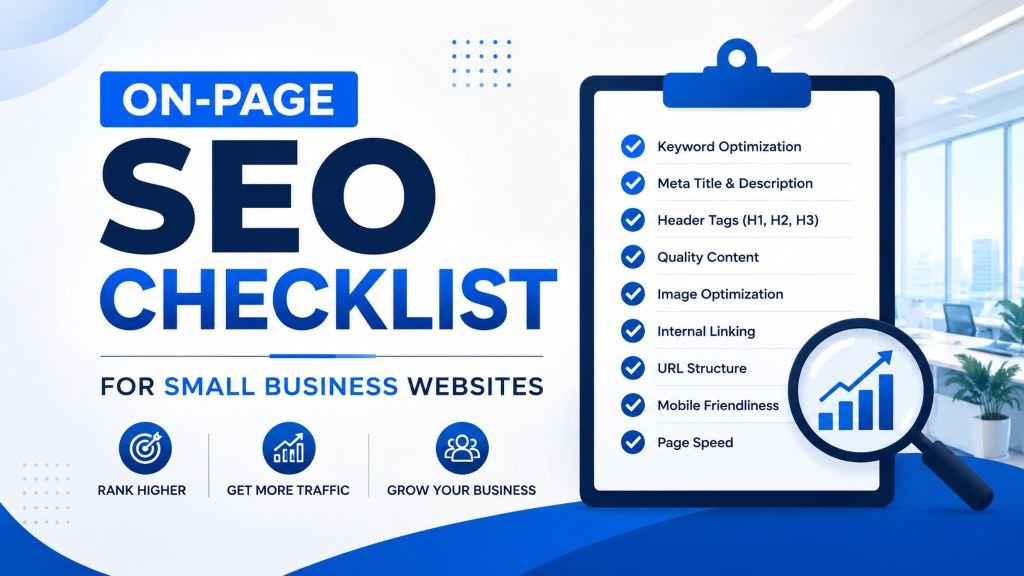
Quick answer: On-page SEO for small business websites means optimizing title tags, headings, content, internal links, images, schema, and page experience on every individual page so search engines — and increasingly AI systems — can fully understand and rank it. The highest-priority items are a unique keyword-matched title tag, one clear H1, content that fully answers search intent, 2-3+ internal links per page, and, new for 2026, a clear answer-first structure that helps the same page get cited by AI Overviews and chat-based search.
On-page SEO is the part of search optimization you have the most direct control over — no backlinks to chase, no algorithm guesswork, just the words, structure, and elements on your own pages. Yet it’s also the part most small business SEO services clients get wrong, simply because nobody ever sat down and checked every page against a proper list.
This checklist covers every on-page element that matters in 2026, organized in the order you should actually tackle them — from foundational keyword targeting down to the small details that round out a fully optimized page.
Bookmark this page or save the checklist at the bottom — it’s designed to be a reference you come back to every time you publish or update a page.
Why On-Page SEO Still Matters in 2026 {#why-matters}
Google’s algorithm has gotten dramatically better at understanding context and intent, but it still relies heavily on the clear, structured signals you put directly on your pages — what the page is about, who it’s for, and why it deserves to rank. Strong on-page SEO is also what gives your content the best chance of being accurately understood and surfaced by AI-powered search features, which increasingly pull directly from well-structured, clearly written pages — a connection made concrete in the new AI-Search Readability section below.
If you’d rather work through this alongside a broader site audit (technical, backlinks, content), our Free SEO Audit Checklist covers this on-page list as one piece of a five-part process.
1. Keyword Research & Targeting {#checklist-areas}
- Identify one primary keyword per page — avoid targeting the same keyword on multiple pages (this causes pages to compete against each other).
- Identify 2-4 closely related secondary keywords or phrases to include naturally throughout the page.
- Check what’s currently ranking for your target keyword and note the content format (guide, list, comparison, product page) — your page should match that intent.
- Confirm the keyword has genuine search demand — even a rough estimate from Google’s autocomplete or “People Also Ask” box is better than guessing, or use Google Keyword Planner via a free Ads account for more concrete numbers.
2. Title Tag
- Keep your title tag under roughly 60 characters so it doesn’t get cut off in search results.
- Include your primary keyword, ideally near the beginning of the title.
- Make every title tag on your site unique — no duplicates across pages.
- Write for clicks, not just keywords — a compelling title outperforms a robotic, keyword-stuffed one.
3. Meta Description
- Keep it under roughly 155 characters.
- Include your primary keyword naturally.
- Write it like an ad — give searchers a clear reason to click your result over a competitor’s.
- Avoid duplicate meta descriptions across multiple pages.
4. URL Structure
- Keep URLs short, readable, and descriptive (e.g.,
/local-seo-checklist/rather than/page?id=4827). - Include your primary keyword in the URL where it reads naturally.
- Use hyphens to separate words, never underscores or spaces.
- Avoid changing URLs after a page is published and indexed — if you must, set up a proper 301 redirect.
5. Heading Structure (H1, H2, H3)
- Use exactly one H1 per page, clearly stating what the page is about.
- Include your primary keyword in the H1 naturally.
- Use H2s to break the page into clear, logical sections.
- Use H3s for sub-points within an H2 section, rather than skipping straight from H2 to H4.
- Make sure headings would make sense read on their own, as a skimmable outline of the page.
6. Content Quality and Depth
- Make sure the content actually answers the searcher’s question completely — thin, surface-level content rarely ranks well for competitive terms.
- Include your primary keyword naturally in the first 100 words.
- Use secondary keywords and related terms throughout, rather than repeating the same exact phrase.
- Break up long paragraphs — aim for 2-4 sentences per paragraph for readability.
- Add bullet points, numbered lists, or tables where they genuinely improve clarity.
- Update outdated statistics, prices, or examples on older pages regularly.
7. Internal Linking
- Link to at least 2-3 other relevant pages on your site from within the content.
- Use descriptive, natural anchor text (e.g., “our local SEO guide”) instead of “click here.”
- Make sure your most important pages (services, cornerstone content) receive internal links from multiple other pages, not just the homepage.
- Check that no important page is buried more than 3 clicks from your homepage.
8. Image Optimization
- Add descriptive alt text to every meaningful image, naturally describing what’s shown.
- Compress images before uploading to keep file sizes small without visibly hurting quality.
- Use descriptive file names (e.g.,
on-page-seo-checklist.pnginstead ofIMG_4827.png). - Choose appropriately sized images for their display size — don’t upload a 4000px image to display at 600px wide.
9. Page Experience Signals
- Confirm the page loads quickly on mobile (test with Google PageSpeed Insights).
- Confirm the page displays correctly and is easy to navigate on a phone screen.
- Make sure there’s no intrusive pop-up blocking content immediately on page load, especially on mobile.
- Check that body text is legible without zooming (font size, contrast, line spacing).
10. Schema Markup (Structured Data)
- Add relevant schema markup where applicable — Article schema for blog posts, FAQ schema for FAQ sections, LocalBusiness schema for your contact/location pages.
- Test your schema using Google’s Rich Results Test tool to confirm it’s implemented correctly.
- Don’t add schema for content that isn’t actually visible on the page — this violates Google’s guidelines.
11. Author Credibility and E-E-A-T Signals
An increasingly important on-page element, especially for anything resembling advice, recommendations, or a high-stakes decision.
- Include a visible author byline with a short bio establishing relevant experience or credentials, not just a generic “Admin” or no attribution at all.
- Link the author’s name to a bio or “About” page where readers can verify who wrote the content.
- For genuinely expert-driven content (medical, financial, legal, or technical advice), consider adding a “reviewed by” credit alongside the author, where applicable.
12. AI-Search Readability (AEO/GEO)
This is the newest addition to a proper on-page checklist, and it works alongside — not instead of — everything above.
- Add a short, direct “quick answer” near the top of long-form pages — a 2-3 sentence summary that fully answers the page’s core question, written so it could stand alone if pulled into an AI Overview or chat-based answer.
- Include a genuine FAQ section with question-phrased headers, paired with
FAQPageschema (see Section 10) — this remains one of the most reliable ways to get pulled into AI-generated answers and voice search results. - Write standalone, factual sentences rather than sentences that only make sense in the middle of a paragraph — AI systems extract and cite cleanly-stated facts far more easily than context-dependent prose.
- Consider an
llms.txtfile at your site root, a simple, emerging convention that gives AI crawlers a structured summary of your site’s key content.
For the fuller picture of how this shift is changing SEO work generally, see SEO Didn’t Die in 2026, and for the tools to check your progress on any of the sections above, our Top 10 Free SEO Tools guide links directly to everything referenced in this checklist.
Quick-Reference Checklist (Copy-Paste Version) {#quick-ref}
ON-PAGE SEO CHECKLIST
[ ] One primary keyword per page, no overlap with other pages
[ ] Title tag under 60 characters, includes primary keyword
[ ] Meta description under 155 characters, includes primary keyword
[ ] Short, descriptive, hyphenated URL
[ ] One H1 with primary keyword
[ ] Logical H2/H3 structure
[ ] Content fully answers search intent, no thin content
[ ] Primary keyword in first 100 words
[ ] 2-3+ internal links with descriptive anchor text
[ ] Alt text + compressed images + descriptive file names
[ ] Mobile-friendly, fast-loading, no intrusive pop-ups
[ ] Relevant schema markup added and tested
[ ] Visible author byline with credentials/bio link
[ ] Quick-answer summary near the top for AI extraction
[ ] FAQ section with FAQPage schema
[ ] Clear CTA placed naturally
How Often Should You Re-Check On-Page SEO? {#re-check}
Run this checklist against every new page before publishing. For existing pages, revisit your top 10-20 traffic-driving pages every 6 months — search intent, competitor content, and Google’s understanding of a topic all shift over time, and a page that was well-optimized a year ago may need a refresh.
Final Thoughts
On-page SEO isn’t glamorous, but it’s the most controllable, fastest-to-fix part of your entire SEO strategy. A page with strong on-page fundamentals gives every other effort — content marketing, backlinks, local SEO, and now AI-search visibility — a much better foundation to build on.
Want a professional review of your most important pages?
ZestRank offers dedicated small business SEO services and affordable SEO services in Delhi — auditing and optimizing on-page SEO for businesses across Delhi NCR, covering everything in this checklist and more, mapped specifically to your industry’s top-ranking competitors. We also handle local SEO if your on-page fixes need to be paired with Google Business Profile and citation work. Get your free SEO audit and see exactly where your pages are falling short.
Frequently Asked Questions {#faqs}
What is on-page SEO?
On-page SEO refers to all the optimization elements you control directly on your own web pages — including title tags, headings, content, internal links, images, and URL structure — as opposed to off-page factors like backlinks from other websites.
How many keywords should I target per page?
Focus on one primary keyword per page, supported by a small number of closely related secondary keywords and natural variations. Targeting too many unrelated keywords on a single page tends to dilute relevance for all of them.
Does on-page SEO alone guarantee a high ranking?
No. On-page SEO is a necessary foundation, but rankings are also influenced by off-page factors like backlinks and overall site authority, as well as technical SEO health. Strong on-page optimization maximizes the ranking potential a page can achieve relative to those other factors.
How long does it take to see results after fixing on-page SEO issues?
Google typically needs to recrawl and reprocess a page after changes, which can take anywhere from a few days to a few weeks. Meaningful ranking improvements, especially for competitive keywords, often take longer as Google reassesses the page’s relevance over time.
Is optimizing for AI search different from optimizing for regular Google rankings?
Not entirely separate — the same fundamentals (clear structure, genuine expertise, complete answers) support both. The main addition is being deliberate about answer-first summaries and FAQ schema, since these specifically help AI systems extract and cite your content accurately, on top of traditional ranking factors.
About the Author: Rohit Nandan
Founder & Lead Digital Marketing ConsultantRohit Nandan is ZestRank's Founder & Lead Digital Marketing Consultant and YouTube SEO Expert, with over 15 years of experience diagnosing and running search campaigns for businesses across Delhi NCR. He personally reviews ZestRank's client projects, with deep expertise in technical SEO infrastructure and YouTube optimization. Have a question about this post? Message Rohit directly on WhatsApp.
Free Consultation
Ready to see how these exact parameters can be configured to expand your physical business discovery indices?
Request Strategy Call WhatsApp Strategist